
☽ ✦ ☉ Astrology widgets for iPhone
Put the sky on your Home Screen
Planetary hours, moon phases, eclipses, retrogrades and a live solar system — computed on your device, drawn as beautiful iOS widgets. 50+ designs, 6 theme packs, one widget free forever.


- 50+ widget designs
- 6 theme packs
- 0 accounts, ads or trackers
Widget gallery
Twenty-three ways to read the sky
Every widget comes in the sizes it deserves — small for a glance, medium for context, large for the full picture.
The previews on this page are illustrations drawn for the web. Layouts, data and details may differ slightly from the widgets in the app.
☉ Planetary hours
Daygrowth · luck · wisdom
☽ Moon
✦ Sun, planets & eclipses
◈ Mixes — small widgets on one big canvas
Daygrowth · luck · wisdom
Straight from the app
Explore, customise, add
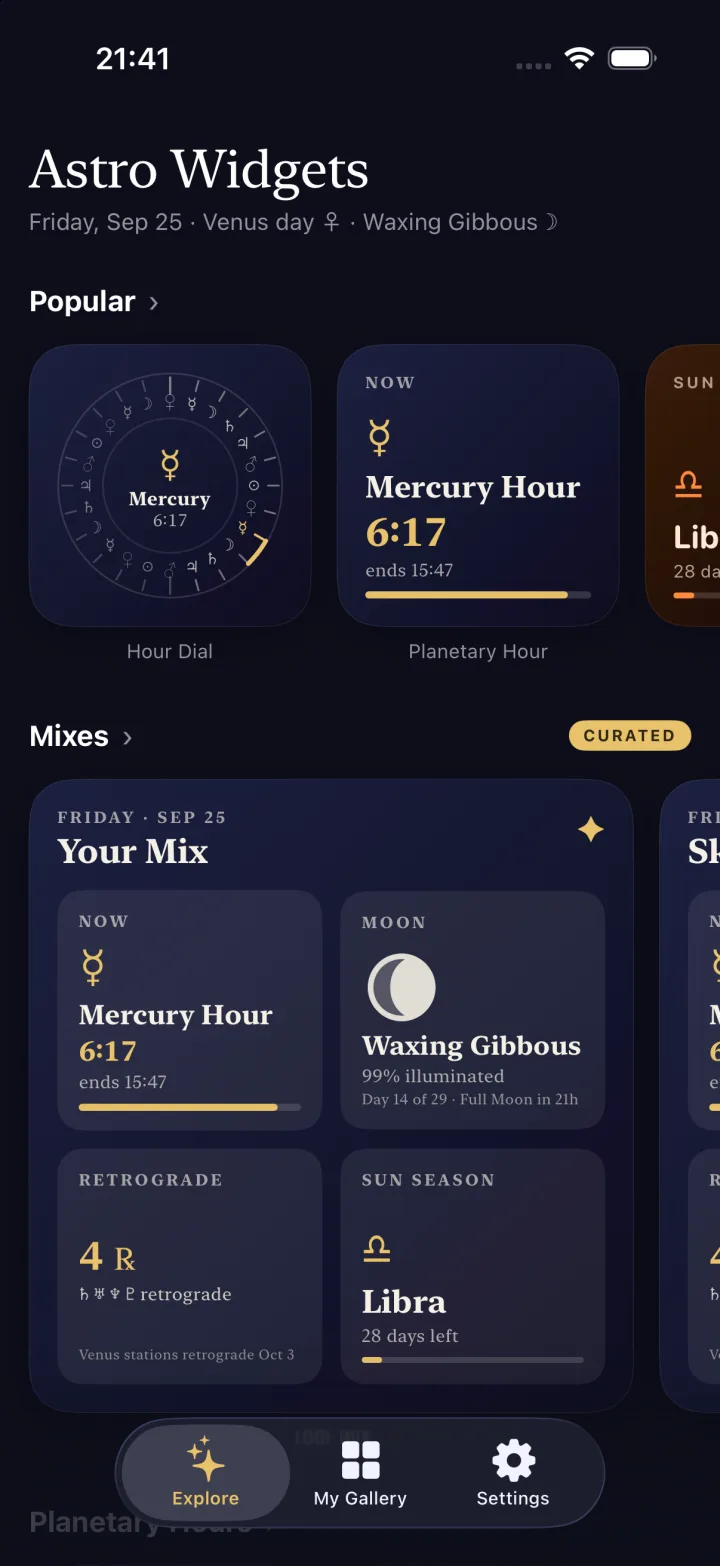
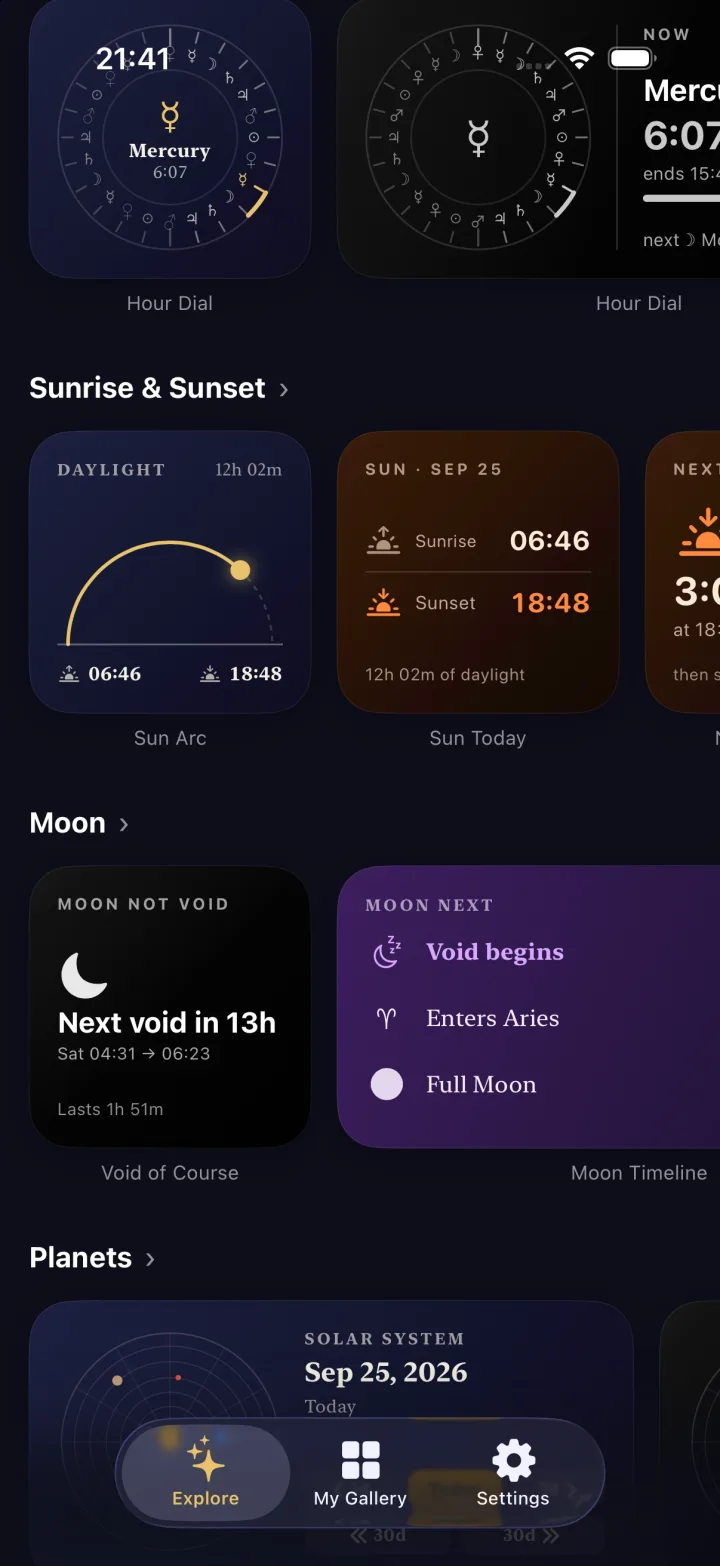
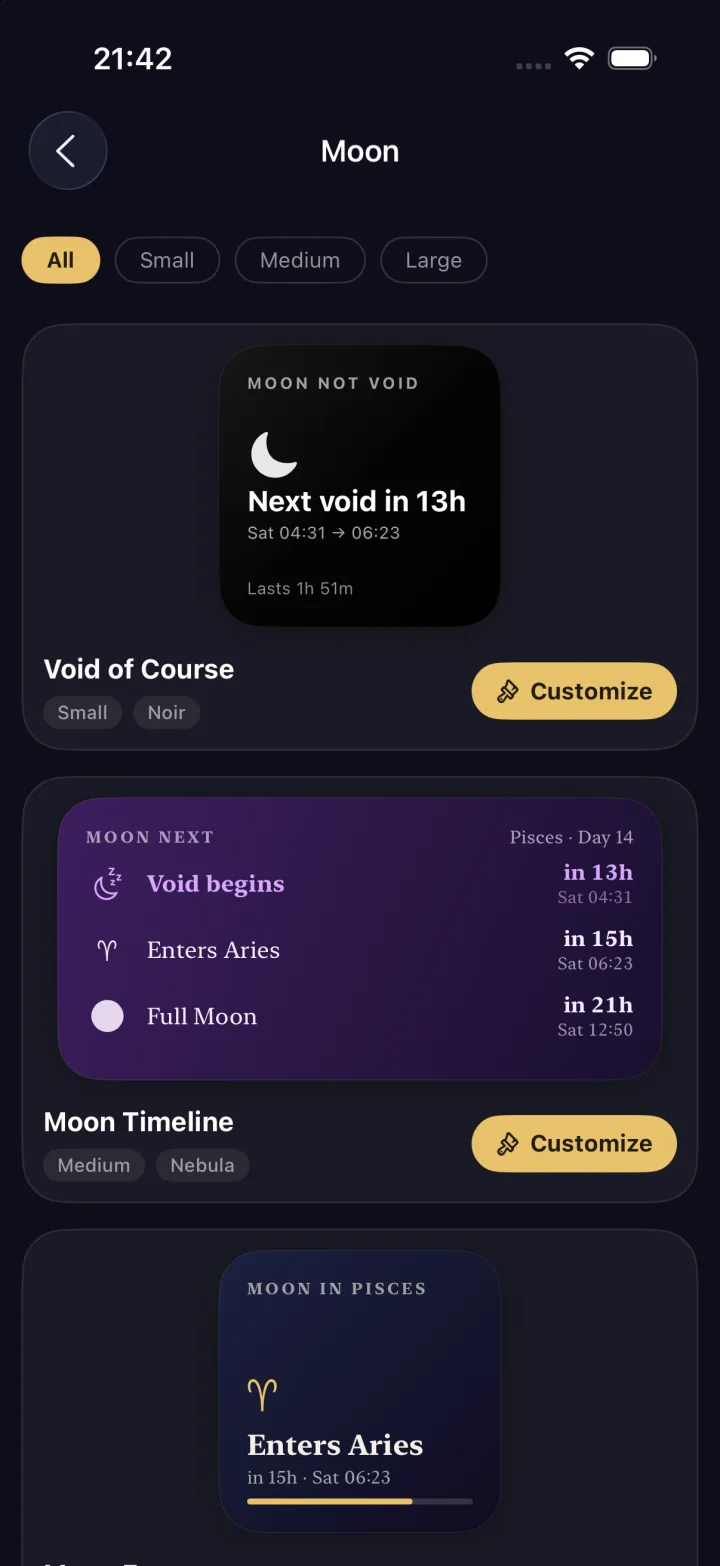
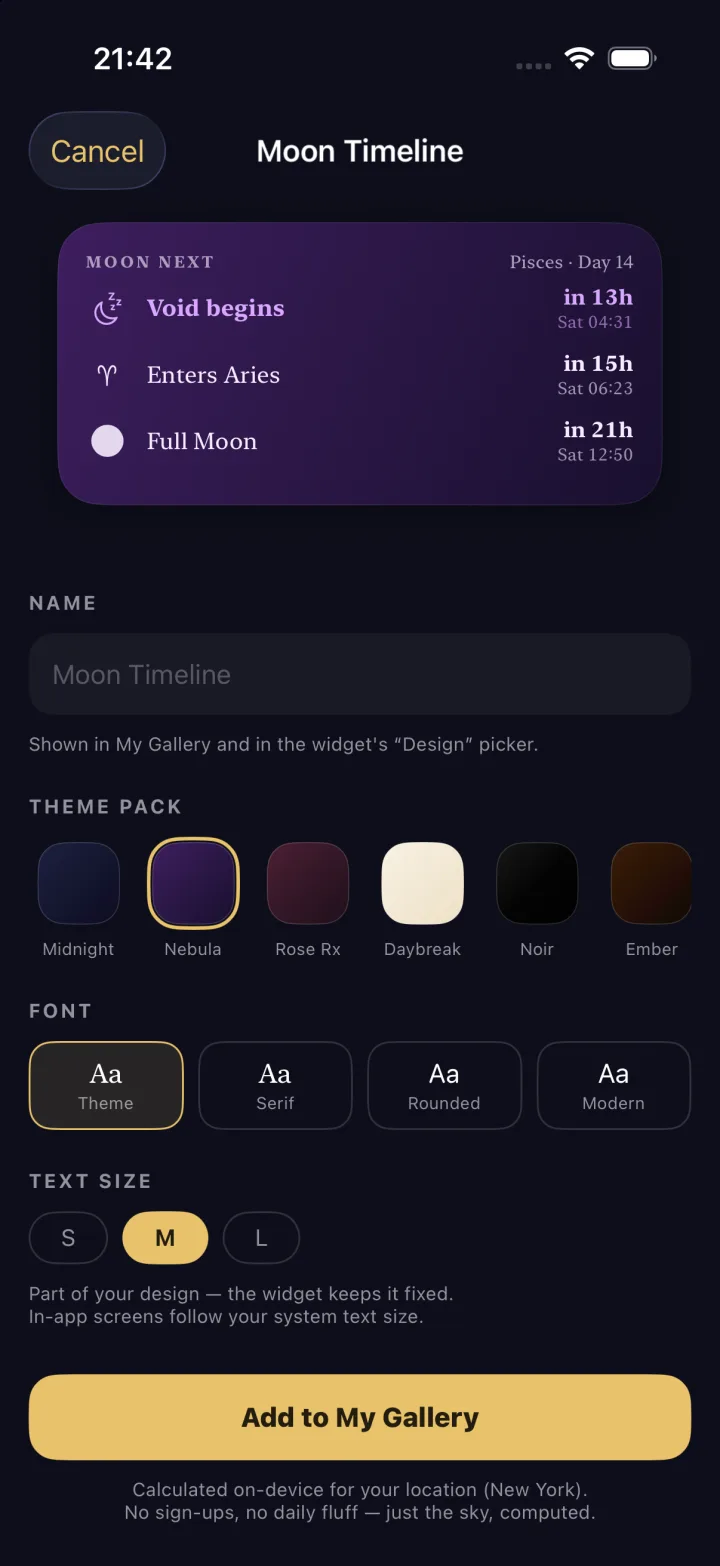
Real screenshots from Astro Widgets on iPhone: the Explore gallery, a category page and the Customize screen where you pick the theme pack, font and text size.
Theme packs
Six moods, every widget
Any design takes any theme. Swap the pack, the font style and the text size, and the widget redraws for your wallpaper. Seasonal packs drop for Halloween, eclipse season and the solstices.
How it works
From gallery to Home Screen in a minute
- 1
Pick a design
Browse Explore by Planetary Hours, Moon, Sun, Planets, Eclipses or Mixes. Seasonal rails appear when the sky calls for them.
- 2
Make it yours
Choose a theme pack, font and text size. Toggle the countdown, dial extras, or compose your own four-module mix. Save it to My Gallery.
- 3
Add the widget
Touch and hold your Home Screen → Edit → Add Widget → search Astro Widgets → pick a size. Tap it once more and choose your saved design.
- 4
Let it run
The widget follows a timeline computed on your iPhone: the planetary hour flips at the minute, the moon advances nightly, countdowns tick without opening the app.
Free & Pro
One widget free, forever. Pro for the rest.
Free
$0 no time limit
- One saved design, small or medium
- Every widget type that comes in those sizes
- Live timelines, location, all the maths
- No account, no ads, no tracking
☽ ✦ ☉ Astro Widgets Pro
Pro
Weekly or annual billed by the App Store · cancel anytime
- Unlimited saved designs
- Large widgets — dials, calendars, tables, the solar system, mixes
- Every theme pack, including seasonal drops
- Supports an indie astrology studio
Prices are shown in the app in your local currency. The annual plan may include a free trial for eligible users; you will not be charged during the trial.
Privacy by design
Your sky is computed on your phone
Astro Widgets has no account, no analytics SDK and no ad network. The city you pick and everything drawn from it stay on your device. The only third party involved is the App Store (with RevenueCat) for subscriptions.
- On-device ephemeris, hours, phases and eclipse tables
- Optional location access, only to centre the map
- No App Tracking Transparency prompt — nothing to track
- Support via Settings → Feedback, straight to a human
FAQ
Questions about astrology widgets
What is Astro Widgets?
Astro Widgets is an astrology widget app for iPhone. It draws planetary hours, moon phases, moon signs, eclipse countdowns, retrograde status, sunrise and sunset times and a live solar system as Home Screen widgets. Everything is computed on your device for the location you choose.
Which astrology widgets are included?
Over 50 designs across 23 widget types: Planetary Hour, Hour Dial, Hours Table, Today's Hours, Day Ruler, Moon Phase, Moon Sign, Next Moon Event, Moon Phases, Moon Calendar, Moon Enters, Void of Course, Moon Timeline, Moon Distance, Solar Eclipses, Lunar Eclipses, Retrograde Watch, Sun Season, Solar System, Sun Today, Sun Arc, Daylight and Next Sun Event, plus curated mixes such as Sky Today, Moon Tonight and Day Ahead.
Is there a free planetary hours widget?
Yes. One small or medium widget is free forever, with no time limit. Pick any small or medium design, including the Planetary Hour widget with its live countdown, and keep it on your Home Screen for free.
What does Astro Widgets Pro unlock?
Pro unlocks unlimited saved designs, large widgets (the Hour Dial, Hours Table, Moon Calendar, Solar System and the mixes) and every theme pack including seasonal drops. Pro is a weekly or annual auto-renewing subscription billed through the App Store; the annual plan may include a free trial.
How do I add an astrology widget to my iPhone Home Screen?
Pick a design in Explore, customise it and add it to My Gallery. Then touch and hold an empty spot on your Home Screen, tap Edit, then Add Widget, search for Astro Widgets, choose a size and add it. Tap the widget once more to open its settings and choose the design you saved under Design.
Does the moon phase widget update automatically?
Yes. Every widget follows a timeline computed on your device, so the planetary hour flips at the exact minute, the moon phase advances night by night and countdowns tick down without opening the app.
How accurate are the planetary hours?
Planetary hours are calculated from the true sunrise and sunset at your coordinates and time zone using the same astronomical engine as the Planetaro app. Day hours run sunrise to sunset and night hours sunset to the next sunrise, each split into twelve, following the Chaldean order of Saturn, Jupiter, Mars, Sun, Venus, Mercury and Moon.
Does the app need my location or an account?
No account, ever. You choose a city on a map or tap Locate me once; the coordinates stay on your device and are only used to compute the sky for that place. Location access is optional and only used to centre the map.
Does Astro Widgets track me or show ads?
No. There are no ads, no analytics SDK and no cross-app tracking, so the app never shows the App Tracking Transparency prompt. Subscriptions are handled by Apple and RevenueCat; see the Privacy Policy for details.
Can I change the colours and fonts of a widget?
Yes. Every design takes one of six theme packs: Midnight, Nebula, Rose Rx, Daybreak, Noir and Ember. You can also override the font style (serif, rounded or modern), the text size and per-widget options such as the countdown line, dial extras or which four modules go in your own mix.
Which iPhones and iOS versions are supported?
Astro Widgets requires iOS 26.0 or later and supports small, medium and large Home Screen widgets on any iPhone running that version.
How do I contact support?
Inside the app, open Settings and tap Feedback. Choose Report a bug, Suggest a feature or Join the beta; the mail is pre-filled with your app version and device so we can help faster. There is no contact form on this website.
☽ ✦ ☉
Ready for your Home Screen
Requires iOS 26.0 or later. Made in the same studio as Planetaro, the planetary hours app trusted by 100,000+ people.